How to Get Your LinkedIn Data & Use It for Marketing in 2026
Jan 6, 2026

Luke Costley-White

温故知新
Study the past to understand the future

What's in Your LinkedIn Data Download? (And Why It's a Marketing Goldmine)

You can download your entire LinkedIn history in one click—every connection, message, comment, reaction, and post you've ever made. But here's the problem: 99% of marketers download it once, never open it, and miss the most valuable free marketing intelligence they'll ever get.

Your LinkedIn data export isn't a backup file. It's a strategic asset that reveals:

What content actually resonates with you (and therefore your audience)
Your authentic voice and expertise areas (from your unfiltered comments)
Exactly who to target for outbound (warm connections ranked by engagement)
Content gaps your competitors haven't filled (topics you consume but don't create)
Your real positioning (vs. what you think it is)

The insight that changes everything: Your LinkedIn activity is a perfect mirror of your target audience's interests—because you ARE your ICP. What you engage with is what they want to see.

What You'll Learn in This Guide

This isn't a generic "how to download LinkedIn data" tutorial (LinkedIn already has that). This is the first comprehensive guide for using LinkedIn data specifically for content strategy and outbound marketing at challenger brands.

You'll learn:

  1. How to download your data (5 minutes) and what's actually valuable in the 40+ files

  2. Content strategy framework using your comments, reactions, and saved posts to build a data-driven content calendar

  3. Outbound targeting system to identify warm leads, segment your network, and craft personalized outreach based on real relationships

  4. Advanced tactics for personal branding, competitive intelligence, and network analysis

  5. Tools and templates to automate the analysis (no coding required)

Time to value: 24 hours from download to having a content calendar and prioritized outreach list.

Who this is for: Marketers, founders, and sales leaders at challenger brands who need to compete with bigger budgets by being smarter with the data they already have.

Table of Contents

  1. How to Download Your LinkedIn Data

  2. FAQ: Common Questions About LinkedIn Data

  3. What's Inside: File-by-File Breakdown

  4. Content Strategy Playbook: Turn Data Into Content

  5. Outbound Marketing Playbook: Build Your Target List

  6. Advanced Analysis Techniques

  7. Tools, Templates & Automation

  8. Privacy & Ethics

  9. Quick Start Checklist

The Strategic Advantage: Why This Matters for Challenger Brands

Big companies have expensive analytics tools, data scientists, and agencies. You have something better: direct access to your own professional network and content consumption patterns.

While enterprise marketing teams analyze aggregate data from third-party tools, you can:

  • See exactly who in your network works at target accounts (Connections.csv)

  • Identify people you've already built relationships with (Comments.csv, Messages.csv)

  • Understand what content triggers engagement in your niche (Reactions.csv, Saved_Items.csv)

  • Find your authentic voice (your comments reveal how you naturally communicate)

  • Spot content gaps (topics you engage with but haven't created content about)

This levels the playing field. You don't need a six-figure marketing stack—you need to use the data you already have.
This is exactly why challenger brands are winning the ROI battle against enterprises.

How to Download Your LinkedIn Data

LinkedIn provides a free data export of your entire account history. Here's how to request it:

Step-by-Step Download Process

  1. Click this link: https://www.linkedin.com/mypreferences/d/download-my-data

  2. If that link doesn't work:

    1. Log into LinkedIn on desktop (mobile doesn't support this feature)

    2. Go to Settings & Privacy (click your profile photo → Settings & Privacy)

    3. Navigate to Data Privacy (left sidebar)

    4. Click "Get a copy of your data"

  3. Select "Request archive" → Choose "Download larger data archive" (NOT "Want something in particular")

    • The larger archive includes engagement history, connections, messages and more

    • The fast option only includes basic profile data

  4. Submit your request

  5. Wait 24-48 hours for an email from LinkedIn

    1. You typically receive it in two parts

    2. They are often in your social inbox, I missed both of mine

  6. Download the ZIP file (link expires after 72 hours, this happened to me so much)

  7. Extract the files to a folder on your computer
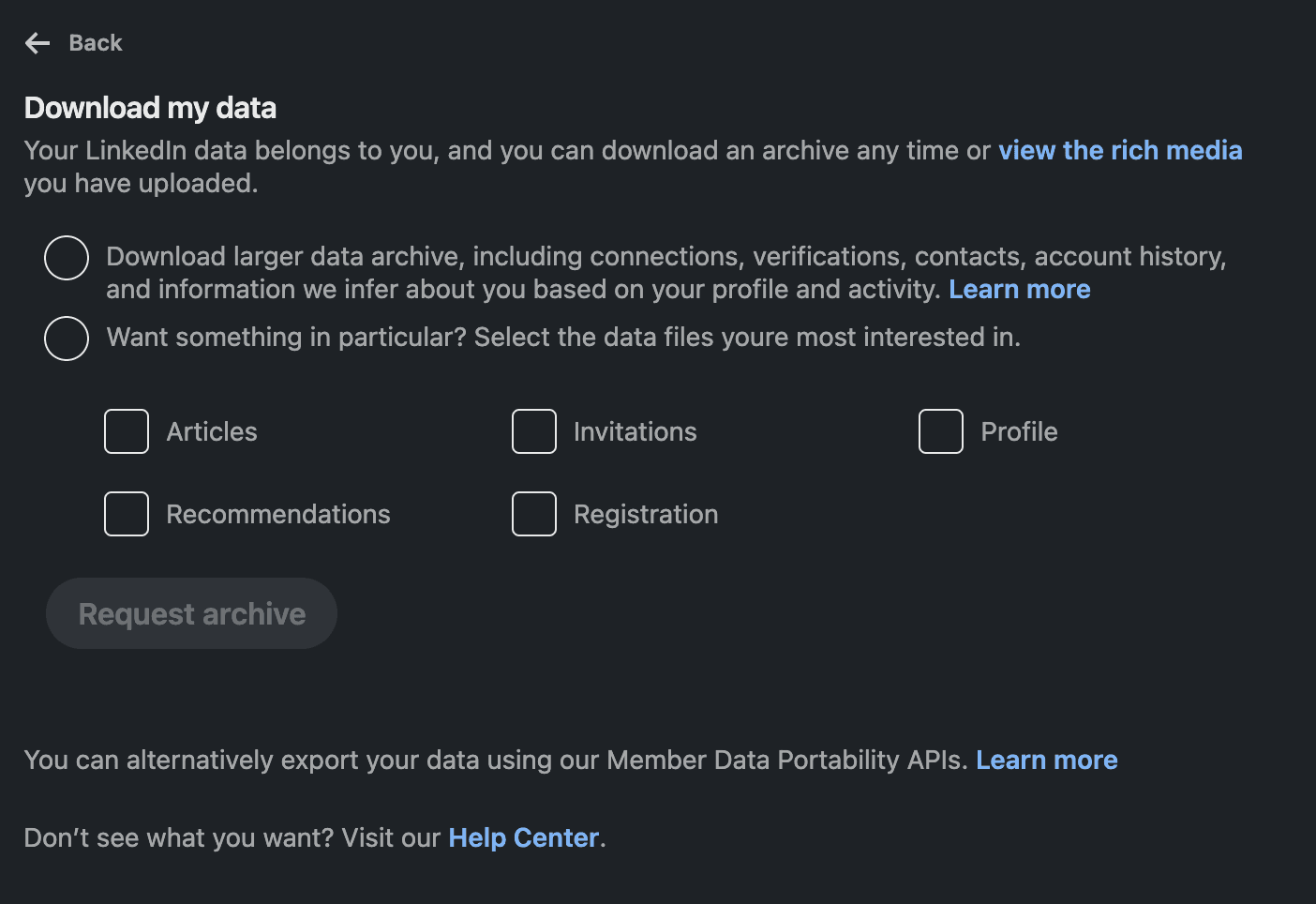
Screenshot of download my data menu from the linkedin settings where you get your full data archive including connections, messages and engagement data.

File size: Typically 5-50 MB depending on your activity history.

Important: The larger archive takes longer to generate but contains the valuable files (Comments.csv, Reactions.csv, Messages.csv) that the fast export doesn't include.

What You'll Receive

Your LinkedIn data export contains 40+ CSV files organized into folders. Here's what actually matters:

High-Value Files for Marketing:

  • Connections.csv - Your entire network (names, companies, titles, connection dates)

  • Comments.csv - Every comment you've made (reveals your interests and voice)

  • Reactions.csv - Posts you've reacted to (your content consumption patterns)

  • messages.csv - DM conversations (relationship depth indicators)

  • Saved_Items.csv - Posts you bookmarked (high-value content signals)

  • Shares.csv - Content you've shared (curation strategy)

  • Invitations.csv - Connection requests sent/received (intent signals)

Medium-Value Files:

  • Endorsement_Received_Info.csv - Who endorsed you (warm contacts)

  • Recommendations_Received.csv - Written recommendations (advocates)

  • Profile.csv - Your current positioning

  • SearchQueries.csv - What you've searched for (unmet needs)

Low-Value Files:

  • Ad targeting data, security logs, skills, courses, etc. (not strategically useful for most marketers)

Pro Tip: Request a new export quarterly to track how your network, engagement patterns, and positioning evolve over time. Compare exports to spot trends.

FAQ: Common Questions About LinkedIn Data

What data can you export from LinkedIn?

You can export your entire LinkedIn account history including: connections (names, companies, titles, emails if shared), messages, comments, reactions, saved posts, shares, endorsements, recommendations, profile data, search history, and engagement activity. The export contains 40+ CSV files totaling 5-50 MB.

The most valuable files for marketers are:

  • Connections.csv - Your network for outbound targeting

  • Comments.csv - Your engagement patterns for content strategy

  • Reactions.csv - Content consumption patterns

  • messages.csv - Relationship depth indicators

How long does it take to get your LinkedIn data?

LinkedIn typically delivers your data export within 24-48 hours via email. The download link expires after 72 hours, so download it promptly. The request itself takes 2 minutes to submit.

Is LinkedIn data export free?

Yes, completely free. LinkedIn is legally required to provide your data under GDPR and CCPA regulations. You don't need Premium or any paid features to download your account data.

What's the difference between "fast export" and "larger archive"?

The fast export (ready in minutes) only includes basic profile data and connections.

The larger archive (ready in 24-48 hours) includes your entire activity history:

  • Comments you've made

  • Posts you've reacted to

  • Messages and conversations

  • Saved items

  • Shares and engagement patterns

For marketing purposes, always choose the larger archive. The fast export is insufficient for content strategy or outbound analysis.

Can you see who viewed your LinkedIn posts in the data export?

No. LinkedIn's data export only shows YOUR activity (posts you viewed, commented on, reacted to), not others' activity on YOUR content.

What you CAN see:

  • Comments YOU made on others' posts

  • Posts YOU reacted to

  • Content YOU saved or shared

  • Messages YOU sent/received

What you CANNOT see:

  • Who viewed your posts

  • Who commented on your posts

  • Who reacted to your posts

  • Post-level engagement metrics

For post engagement metrics, you need LinkedIn's native analytics or a third-party tool like DOJO AI.

How can marketers use LinkedIn data for content strategy?

Marketers can analyze their LinkedIn data export to:

  1. Identify real expertise areas - Analyze Comments.csv to see which topics you naturally engage with (these become your content pillars)

  2. Find content gaps - Compare topics you comment on vs. topics you post about

  3. Build a swipe file - Use Saved_Items.csv to catalog high-performing content formats and hooks

  4. Discover authentic voice - Your comments reveal your natural communication style

  5. Understand engagement triggers - What makes you react vs. comment vs. save?

The key insight: Your engagement patterns predict what your audience wants because you are your own ICP.

How can you use LinkedIn data for outbound marketing?

Your LinkedIn data export enables sophisticated outbound targeting:

  1. Build a warm target list - Score connections by engagement (comments × 3 + DMs × 5 + reactions × 1)

  2. Identify inbound interest - People who sent you connection requests or endorsed you

  3. Target account mapping - See which target companies you already have connections at

  4. Personalized outreach - Reference specific comments, shared interests, or past conversations

  5. Re-engagement campaigns - Find people you messaged 6-12 months ago but went quiet

Result: Replace cold outreach with warm, context-rich messages based on real relationship data.

What's the best way to analyze LinkedIn connections data?

To analyze your Connections.csv file:

  1. Import to a spreadsheet (Google Sheets or Excel)

  2. Segment by:

    • Company (identify target accounts)

    • Role/title (find decision-makers)

    • Industry (cluster by vertical)

    • Connection date (newer = warmer)

  3. Cross-reference with engagement data:

    • Who from your connections have you messaged? (messages.csv)

    • Who have you engaged with their content? (Comments.csv, Reactions.csv)

    • Who engaged with YOU? (Endorsement_Received_Info.csv)

Create an "engagement score" to prioritize warm outreach targets over cold connections.

What's Inside: File-by-File Breakdown

🔥 Tier 1: Highest Value Files for Marketing

1. Comments.csv - Your Engagement DNA

What it contains: Every comment you've ever made on LinkedIn posts.

Columns typically include:

  • Comment text

  • Post author

  • Date/time

  • URL to original post

Why it's valuable:

This is your most authentic content. Comments are unfiltered, immediate reactions that reveal:

  • Your real areas of expertise (not what your profile says)

  • Your natural voice and tone

  • Who you engage with most (warm outreach targets)

  • Topics that trigger your engagement

How to use it for content strategy:

  1. Topic clustering: Export to spreadsheet, read 50-100 comments, tag by topic

    • Count frequency: Top 5 topics = your content pillars

  2. Voice analysis: Note your tone, humor, word choice

    • Write content that sounds like your comments (not generic LinkedIn-speak)

  3. Content gaps: Topics you comment on but haven't posted about = opportunities

  4. Engagement triggers: What makes you comment vs. just react?

    • Apply these triggers to your content

How to use it for outbound:

  1. Warm target identification: Sort comments by author

    • Count how many times you've commented on each person's posts

    • 3+ comments = existing relationship, warm outreach

  2. Conversation starters: "I noticed I've commented on 5 of your posts about [topic]—clearly I find your perspective valuable..."

  3. Industry intelligence: Which companies/industries do you engage with most?

Quick action:


2. Reactions.csv - Your Content Diet

What it contains: Every post you've reacted to (like, love, insightful, celebrate, support, curious).

Why it's valuable:

Reactions are lower-friction than comments, so you react more frequently. This creates a larger dataset of content that resonates with you.

How to use it for content strategy:

  1. Content diet analysis: What type of content do you consume?

    • Text posts vs. carousels vs. videos vs. articles?

    • Short-form vs. long-form?

    • Data-driven vs. storytelling?

  2. Competitor monitoring: Who are similar thought leaders in your space?

    • What are they posting about?

    • What angles are working?

  3. Trend spotting: Track which topics get your attention over time

    • Are you engaging more with AI content? Personal branding? Data analysis?

  4. Format preferences: Which post formats get your attention?

    • Create content in formats YOU respond to

How to use it for outbound:

  1. High-volume engagement: People you react to 5+ times but haven't connected with

  2. Shared interests: "I noticed I've reacted to several of your posts about [topic]..."

  3. Influencer identification: Who influences your thinking?

    • These people might be collaboration or partnership targets

Content hack:


3. Connections.csv - Your Network Goldmine

What it contains: Your entire professional network.

Columns typically include:

  • First name, last name

  • Email address (if they've shared it)

  • Company

  • Position

  • Connected on (date)

Why it's valuable:

This is your outbound marketing database. But most people just have an undifferentiated list of "connections." The opportunity is in SEGMENTATION and PRIORITIZATION.

How to use it for outbound:

  1. Target account mapping:

    • Create a list of your top 50 target companies

    • Filter Connections.csv by company

    • Result: You now know exactly who you're connected to at each target account

  2. Role segmentation:

    • Filter by decision-maker titles: CMO, VP Marketing, Head of, Director, Founder

    • Separate from practitioners

    • Prioritize decision-makers for outreach

  3. Recency scoring:

    • Sort by "Connected on" date

    • Connections from last 30 days = warmest

    • Connections from 6-12 months ago = re-engagement opportunity

    • Connections from 2+ years ago = effectively cold

  4. Industry clustering:

    • Group by industry vertical

    • Create vertical-specific content and outreach

How to use it for content strategy:

  1. Audience analysis:

    • What's the breakdown of your network by role?

    • Are you connected to your actual target audience?

  2. Positioning validation:

    • Does your network match your positioning?

    • If you position as "B2B SaaS marketer" but your network is mostly agencies, there's a mismatch

Advanced tactic:


4. messages.csv - Relationship Depth Map

What it contains: All your LinkedIn DM conversations (text, timestamps, sender/recipient).

Why it's valuable:

DMs are the highest-intent interaction on LinkedIn. Volume and direction (inbound vs. outbound) reveal relationship strength.

How to use it for outbound:

  1. Relationship depth scoring:

    • Count messages per person

    • 10+ messages = strong relationship

    • 3-9 messages = developing relationship

    • 1-2 messages = weak tie

  2. Inbound interest signals:

    • Who messaged YOU first?

    • These people have demonstrated interest = highest-priority targets

  3. Re-engagement opportunities:

    • Filter by date of last message

    • 3-6 months ago = "Has it really been X months?" re-engagement

    • 12+ months ago = Reset with fresh context

  4. Conversation starters:

    • Reference previous conversations

    • "Last time we talked, you mentioned [X]—curious how that played out?"

How to use it for content strategy:

  1. FAQ mining:

    • What questions do people ask you repeatedly?

    • These are content topics your audience needs

  2. Pain point identification:

    • What problems do people DM you about?

    • Create content addressing these pain points

  3. Topic validation:

    • If 5+ people DM you about the same thing, it's worth posting about publicly

Privacy note: DMs are sensitive. Use PATTERNS, not verbatim content.

Example analysis:


5. Saved_Items.csv - Your Premium Swipe File

What it contains: Posts you've bookmarked (you don't save everything—this is high-signal data).

Why it's valuable:

Saved items represent content valuable enough to revisit. This is curated inspiration and competitive intelligence.

How to use it for content strategy:

  1. Swipe file creation:

    • Categorize saved posts by format (carousel, text, video)

    • Note the hook/first line that grabbed you

    • Identify patterns in what makes you save vs. just react

  2. Format analysis:

    • Do you save carousels more than text posts?

    • Create content in formats YOU find valuable

  3. Content gaps:

    • Review saved items from 6+ months ago

    • What did you save but never act on?

    • That's content YOU should create (you already know there's demand)

  4. Research repository:

    • Use saved items as sources for your own content

    • Build on others' ideas with your unique angle

How to use it for outbound:

  1. Deep engagement signal:

    • If you saved someone's content, they're highly relevant to you

    • Outreach: "I saved your post about [X] because [specific reason]..."

  2. Collaboration targets:

    • People whose content you save consistently

    • Potential co-marketing, guest posts, or partnerships

Content opportunity:


6. Shares.csv - Your Curation Strategy

What it contains: Content you've shared/reposted on your profile.

Why it's valuable:

What you share publicly signals your positioning and influences your personal brand.

How to use it for content strategy:

  1. Curation audit:

    • Are you sharing more than creating?

    • Ideal ratio: 70% original, 30% curated

  2. Positioning analysis:

    • What does your sharing say about your brand?

    • Are you amplifying the right voices?

  3. Content partnerships:

    • Who do you share most often?

    • Reach out for collaboration

How to use it for outbound:

  1. Advocate identification:

    • People whose content you've amplified

    • They'll likely be receptive to outreach

  2. Co-marketing:

    • "I've shared several of your posts—would you be interested in collaborating on [X]?"

7. Invitations.csv - Intent Signals

What it contains: Connection requests you've sent and received.

Columns:

  • Name, Company, Position

  • Date sent/received

  • Status (accepted/pending/withdrawn)

  • Direction (sent/received)

Why it's valuable:

Inbound connection requests = brand awareness. Acceptance rates = receptiveness.

How to use it for outbound:

  1. Inbound interest:

    • People who sent YOU requests = they know who you are

    • High-priority warm targets

    • Outreach: "I noticed you sent me a connection request—curious what prompted you to reach out?"

  2. Acceptance rate analysis:

    • Who accepts your requests?

    • What do they have in common? (company type, role, industry)

    • Double down on similar profiles

  3. Pending follow-up:

    • Requests pending for 30+ days

    • Should you withdraw and try a different approach?

How to use it for content strategy:

  1. Brand awareness proxy:

    • Spike in inbound requests after certain posts?

    • Note what you posted around that time

    • Create more content like that

8. Endorsement_Received_Info.csv - Your Warm Contact List

What it contains: Who endorsed you for which skills.

How to use it for outbound:

  1. Warm outreach list:

    • People who endorsed you value your expertise

    • They'll likely be receptive to conversation

  2. Testimonial mining:

    • "I noticed you endorsed me for [skill]—would you be open to providing a quick testimonial?"

How to use it for content strategy:

  1. Positioning reality check:

    • Are you being endorsed for what you WANT to be known for?

    • If not, adjust your content and profile

9. Recommendations_Received.csv - Your Biggest Advocates

What it contains: Written recommendations people have given you.

How to use it for outbound:

  1. Referral sources:

    • These people will vouch for you publicly

    • Ask them to introduce you to relevant contacts

How to use it for content strategy:

  1. Social proof:

    • Quote recommendations in your content

  2. Value prop validation:

    • What do people say you're great at?

    • Is this what you want to be known for?

🔶 Tier 2: Valuable for Strategy

10. Hashtag_Follows.csv - Content pillars you track

11. Member_Follows.csv - Thought leaders you learn from (competitive intelligence)

12. Company_Follows.csv - Target accounts or inspiration sources

13. Votes.csv - Polls you've engaged with (opinion clustering)

14. SearchQueries.csv - What you've been searching for (unmet needs = content ideas)

🔹 Tier 3: Personal Brand Intelligence

15. Inferences_about_you.csv - How LinkedIn categorizes you (positioning audit)

16. Ad_Targeting.csv - How advertisers see you (ICP validation)

17. Profile.csv - Your current positioning (track evolution)

Content Strategy Playbook

Step 1: Identify Your Real Expertise (30 minutes)

Goal: Find topics you genuinely care about (not what you think you should post about).

Method:

  1. Open Comments.csv in a spreadsheet

  2. Read through your last 50-100 comments

  3. Tag each comment with a topic category

  4. Count frequency by category

  5. Identify top 5 topics

Result: These are your content pillars.

Validation checklist:

  • ✅ Cross-reference with Reactions.csv (topics you engage with)

  • ✅ Cross-reference with Saved_Items.csv (topics you value)

  • ✅ Cross-reference with Hashtag_Follows.csv (topics you track)

Red flag: If your pillars don't match what you're currently creating content about, you have a positioning mismatch.

Example:


Step 2: Find Content Gaps (20 minutes)

Goal: Discover topics you consume but don't create about.

Method:

  1. List topics you frequently:

    • Comment on (Comments.csv)

    • React to (Reactions.csv)

    • Save (Saved_Items.csv)

  2. List topics you've published about:

    • Review your recent posts manually

    • OR use Articles folder if you publish LinkedIn articles

  3. Subtract what you've created from what you engage with

The gap = your content opportunity list

Why this works: You already have opinions and knowledge on these topics (proven by your engagement), but you haven't positioned yourself as an expert yet.

Example:


Step 3: Build Your Content Swipe File (45 minutes)

Goal: Never start from a blank page again.

Method:

  1. Export Saved_Items.csv

  2. Review each saved post

  3. Create a spreadsheet with columns:

    • Original post URL

    • Author

    • Topic

    • Format (carousel, text, video, poll, article)

    • Hook (first line)

    • Why it worked (your analysis)

    • How you could adapt it

Bonus: Set a quarterly reminder to review items you saved 6+ months ago but never acted on.

Example template:

URL

Author

Topic

Format

Hook

Why it worked

My adaptation

[link]

@name

AI tools

Carousel

"99% of marketers waste money on..."

Contrarian take + specific number

"99% of challenger brands overlook..."

[link]

@name

Personal brand

Text

"I made $1M mistake so you don't have to"

Vulnerability + lesson

"I wasted 6 months on content—here's what I learned"

Step 4: Find Your Authentic Voice (30 minutes)

Goal: Write in YOUR voice, not generic LinkedIn-speak.

Method:

  1. Export Comments.csv

  2. Read 20-30 of your recent comments

  3. Note patterns:

    • Do you use humor? What type?

    • Do you challenge ideas or typically agree?

    • What's your tone? (Formal, casual, technical, conversational)

    • What phrases do you use repeatedly?

    • Do you use questions? Analogies? Data?

  4. Write content that sounds like your comments

Why this works: Your comments are unfiltered and authentic. Your posts should be too.

Example analysis:


Step 5: Understand Engagement Triggers (30 minutes)

Goal: Identify what makes you engage (so you can create it for others).

Method:

  1. Review Reactions.csv: What did you just "like"?

  2. Review Comments.csv: What made you COMMENT (higher engagement)?

  3. Review Saved_Items.csv: What was valuable enough to save?

Analysis framework:

Engagement Type

What triggers it

Example

Reaction only

Agree but nothing to add

"Good tip on [X]"

Comment

Disagree, add perspective, ask question

"Interesting take, but what about [Y]?"

Save

Actionable, want to reference later

"5-step framework for [X]"

Share

Want to amplify, aligns with your brand

"This perfectly explains [concept]"

Apply to your content:

  • Want reactions? → Post helpful tips

  • Want comments? → Post controversial takes or ask questions

  • Want saves? → Post frameworks and actionable guides

  • Want shares? → Post data-driven insights or bold perspectives

Step 6: Create a Data-Driven Content Calendar (60 minutes)

Goal: Plan content around proven interest areas.

Template:

Week

Topic

Format

Hook/Angle

Why this topic

Status

1

[Pillar 1]

Carousel

Contrarian take

30% of my comments

Drafted

2

[Content gap]

Text post

Personal story

I engage but don't create

Idea

3

[Pillar 2]

Video

How-to

25% of my comments

Research

4

[Saved item adaptation]

Thread

Framework

Saved 6 months ago, never acted on

Outline

Frequency: Start with 2-3x per week. Consistency beats volume.

Pro tip: Batch-create content. Set aside 4 hours once per week to write 3-5 posts. Schedule them.

For more on efficient content creation at scale, see how to generate leads across LinkedIn, Reddit, and your blog using AI brand voice.

Outbound Marketing Playbook

The question of whether marketing should own outbound instead of sales is increasingly relevant as data-driven approaches like this become standard. Lets give you an advantage in that competition!

Step 1: Build Your Warm Target List (60 minutes)

Goal: Identify people you already have a relationship with (even if weak).

Method: The Engagement Score System

Priority 1: Calculate Engagement Scores

  1. Count comments by person (Comments.csv)

  2. Count messages by person (messages.csv)

  3. Count reactions by person (Reactions.csv)

  4. Calculate score:

Why these weights?

  • DMs = highest intent (×5)

  • Comments = public engagement (×3)

  • Reactions = awareness (×1)

Priority 2: Add Inbound Interest Signals

  1. List people who sent YOU connection requests (Invitations.csv, direction = received)

  2. List people who endorsed you (Endorsement_Received_Info.csv)

  3. List people who recommended you (Recommendations_Received.csv)

Priority 3: Filter Existing Connections

  1. Export Connections.csv

  2. Filter by:

    • Target company

    • Target role (decision-makers)

    • Connection date (last 90 days = warmest)

Output: A scored, prioritized warm outreach list.

Example:

Name

Company

Role

Engagement Score

Signal

Priority

Jane Smith

Acme Corp

CMO

23

5 comments, 2 DMs, 8 reactions

HIGH

John Doe

Beta Inc

Dir Marketing

8

Endorsed you for "Content Strategy"

MEDIUM

Sarah Johnson

Target Co

VP Marketing

0

Sent you connection request

MEDIUM

Step 2: Segment by Warmth (20 minutes)

Goal: Group targets by outreach strategy.

Segmentation:

1. HOT (Engagement Score 15+)

  • You've had real interactions

  • They know who you are

  • Strategy: Personal, reference-based outreach

  • Approach: "I've commented on 5 of your posts about [topic]—would love to discuss..."

2. WARM (Engagement Score 5-14 OR inbound interest)

  • Some awareness exists

  • Strategy: Light touch, value-first

  • Approach: "Noticed you [specific action]—thought this might be relevant..."

3. CONNECTED BUT COLD (Score 0-4)

  • In your network but no engagement

  • Strategy: Re-engagement with fresh context

  • Approach: "We connected [timeframe] ago—saw you're now at [company]..."

4. TARGET BUT NOT CONNECTED

  • From your ICP list, not in network yet

  • Strategy: Connection request + value offer

  • Approach: "Saw your post about [X]—we're working on similar challenges at..."

Step 3: Craft Personalized Outreach (30 minutes)

Template 1: HIGH Engagement Targets (Score 15+)

Subject: Following up on our [topic] conversations

Hey [Name],

I was reviewing my LinkedIn activity and realized I've commented on 
[X number] of your posts about [topic] over the past [timeframe]—
clearly I find your perspective valuable.

[Specific reference to a recent post or comment exchange]

I'm working on [brief, relevant context], and I'd love to get your 
take on [specific question related to their expertise].

Would you be open to a 15-minute call next week?

Best,
[Your name]

Why it works:

  • ✅ Data-driven (specific number)

  • ✅ Acknowledges existing relationship

  • ✅ Shows you pay attention

  • ✅ Asks for something specific (not vague "pick your brain")

Template 2: INBOUND Interest Targets (They connected/endorsed you)

Hey [Name],

I noticed you [sent me a connection request / endorsed me for X] 
[timeframe] ago—thank you.

I'm curious what prompted you to [connect/endorse]? I see you're 
at [Company] working on [Role/Area based on their profile].

[Relevant insight or value statement based on their situation]

If there's a way I can be helpful or if you'd like to discuss 
[topic relevant to them], let me know.

Best,
[Your name]

Why it works:

  • ✅ Acknowledges their action first

  • ✅ Shows curiosity (not pitching immediately)

  • ✅ Offers value before asking

  • ✅ Opens door without pressure

Template 3: RE-ENGAGEMENT (Connected but inactive)

Hey [Name],

We connected [X months] ago, but I don't think we've had a real 
conversation yet.

I saw you recently [posted about X / changed roles to Y / your 
company announced Z—find this on their profile].

[Relevant insight or question about their recent activity]

[Brief value statement related to their current situation]

Worth a conversation?

Best,
[Your name]

Why it works:

  • ✅ Acknowledges the gap honestly

  • ✅ Shows you're paying attention NOW

  • ✅ Relevant to their current situation (not generic)

Step 4: Timing Intelligence (15 minutes)

Goal: Reach out when the relationship is warmest.

Optimal timing from your data:

1. Recent engagement (Strike immediately)

  • You commented on their post in last 7 days → Message within 24-48 hours

  • They accepted your connection request → Message within 3 days

  • They messaged you → Respond same day

2. Recent connection (Warm window)

  • Connected in last 30 days → Much warmer than old connections

  • Connected 6-12 months ago but never talked → Re-engagement opportunity with "time flies" angle

3. Dormant relationships (Re-engagement)

  • Last messaged 3-6 months ago → "Has it really been X months?" approach

  • Last messaged 12+ months ago → Reset with fresh, relevant context

4. Avoid:

  • ❌ Messaging immediately after connecting (looks automated)

  • ❌ Messaging people you haven't engaged with in 2+ years out of the blue

  • ❌ Generic batch messages (personalization is why you have this data)

Step 5: Target Account Mapping (45 minutes)

Goal: Identify which target companies you already have a foothold in.

Method:

1. Create your target account list

  • List your top 50 target companies

  • Prioritize by company size, industry, fit with your ICP

2. Map existing connections


3. Create target account map

Target Company

Connections

Role

Engagement Score

Strategy

Acme Corp

Jane Smith

CMO

18

Direct outreach: ask for intro to CEO

Beta Inc

John Doe

Marketing Mgr

2

Re-engage first, then ask for intro

Gamma LLC

None

0

Content strategy: start engaging, then connect

Output categories:

  • Green (Warm connections): Direct outreach or ask for introductions

  • ⚠️ Yellow (Cold connections): Re-engage before asking for anything

  • Red (No connections): Long-term strategy: content + engagement + connection request

Step 6: Referral Mining (30 minutes)

Goal: Leverage warm relationships to reach cold targets.

Method:

1. Identify your warmest connections

  • Engagement score 20+

  • Multiple DM conversations

  • People who've recommended/endorsed you

2. For each warm connection, ask:

  • What's their company/industry?

  • What's their likely network?

  • Who do they probably know that I want to know?

3. Craft referral request:

Hey [Warm Connection],

Hope you're doing well! Quick question:

I'm trying to connect with [Type of Role] at [Type of Company] 
who are dealing with [Specific Problem].

Do you happen to know anyone in that space who might be worth 
talking to? No worries if not.

Happy to return the favor anytime.

Best,
[Your name]

Pro tips:

  • ✅ Don't ask for a specific person by name initially

  • ✅ Let them suggest someone (they'll intro you to whoever they have the best relationship with)

  • ✅ Make it easy: describe the TYPE of person, not a specific individual

  • ✅ Always offer to reciprocate

Advanced Analysis Techniques

1. Time Series Analysis

Track evolution over multiple quarterly exports:

  • Connection growth rate

  • Engagement volume trends

  • Topic evolution in your comments

  • Network composition changes

2. Network Clustering

Identify distinct groups in your network:

  • Fintech cluster? Agency cluster? SaaS cluster?

  • Use for targeted content and referral strategies

3. Engagement Correlation

Cross-reference files to understand relationship progression:

  • Do your comments lead to DMs?

  • Do your reactions lead to connection requests?

  • What's the path from weak tie to strong tie?

4. Content Performance Reverse Engineering

Search messages.csv for phrases like:

  • "I saw your post about..."

  • "Read your article on..."

  • Note which content triggered high-intent DMs

5. Influence Mapping

  • Who influences you: Rank by comment/reaction/share frequency

  • Who you influence: People who endorsed, recommended, or requested to connect with you

This type of analysis reveals hidden marketing-to-lead correlations that traditional attribution models miss.

Tools, Templates & Automation

Spreadsheet Tools

Google Sheets / Excel basics:

  • Pivot tables for frequency counts

  • COUNTIF to count comments by author

  • VLOOKUP to cross-reference files

  • Sort and filter for segmentation

Pro tip: Create a master spreadsheet with tabs for:

  • Engagement scores

  • Target account map

  • Content calendar

  • Swipe file

Text Analysis

  • Word clouds for topic identification (use Comments.csv text)

  • Keyword frequency counters

  • Sentiment analysis (tone of your comments)

CRM Integration

Workflow:

  1. Export enriched Connections.csv (with engagement scores)

  2. Import to your CRM (HubSpot, Salesforce, etc.)

  3. Tag contacts with:

    • Engagement score

    • Last engagement date

    • Topics they engage with

  4. Set up automated re-engagement sequences

No-Code Automation Ideas

  • Calendar reminder to download data quarterly

  • Zapier: New connection → Add to CRM with engagement score

  • Google Sheets formulas to auto-calculate engagement scores

  • Airtable database for contact relationship tracking

Privacy & Ethics

❌ What You Should NOT Do

Don't scrape or publicly share others' data:

  • Your export contains info about other users

  • Don't publish names, messages, or identifying info without consent

Don't use messages verbatim in content:

  • Paraphrase patterns and themes only

Don't spam people because you have data:

  • Engagement ≠ permission to pitch

  • Use data to be RELEVANT, not creepy

Don't over-personalize:

  • ❌ "On March 3rd at 2:47pm you liked my post about..." = CREEPY

  • ✅ "I noticed we're both interested in [topic]" = FINE

✅ What You SHOULD Do

Use patterns, not personal details:

  • Focus on themes and insights

  • Respect privacy of individual interactions

Ask permission:

  • If you want to reference a DM in content, ask first

Focus on your own behavior:

  • What YOU engage with = fine to analyze and share

  • What OTHERS do = private to them

Add value first:

  • Use data to understand people better, then serve them better

  • Personalization should feel helpful, not invasive

Quick Start Checklist

Week 1: Foundation

  • Download LinkedIn data (request larger archive)

  • Extract and organize files

  • Read this guide and choose your focus (content, outbound, or both)

  • Set up your analysis spreadsheet

Week 2: Content Strategy

  • Analyze Comments.csv for topic patterns (30 min)

  • Identify your top 5 content pillars (20 min)

  • Find content gaps (20 min)

  • Build swipe file from Saved_Items.csv (45 min)

  • Plan first month of content calendar (60 min)

  • Publish first data-driven post

Week 3: Outbound Prep

  • Calculate engagement scores (60 min)

  • Segment targets by warmth (20 min)

  • Create target account map (45 min)

  • Draft personalized outreach templates (30 min)

  • Identify 20 highest-priority targets

Week 4: Execution

  • Send 10 warm outreach messages

  • Publish 2-3 content pieces

  • Track response rates

  • Refine approach based on results

Ongoing (Monthly)

  • Review engagement patterns (which posts drove DMs?)

  • Update target lists

  • Add new saved items to swipe file

  • Re-engage dormant connections

Quarterly

  • Download fresh data export

  • Compare with previous export (growth trends)

  • Adjust content pillars based on evolving interests

  • Refresh outbound target list

Real-World Use Cases

1. Content Creator → Build Audience

  • Analyze Comments.csv to find authentic content pillars

  • Use Saved_Items.csv to build swipe file

  • Track topic evolution to stay current

  • Identify content gaps competitors haven't filled

2. Founder → Outbound Sales

  • Build engagement-scored target list

  • Map target accounts to existing connections

  • Craft personalized outreach based on real interactions

  • Mine referrals from warm connections

3. Marketer → Personal Brand

  • Audit positioning via endorsements and recommendations

  • Analyze network composition vs. target audience

  • Find authentic voice from Comments.csv

  • Build content calendar around real expertise

4. Sales Leader → Pipeline Building

  • Identify warm leads from messages and engagement

  • Re-engage dormant prospects

  • Track relationship progression from comments → DMs → calls

  • Map decision-maker networks at target accounts

5. Agency → Client Development

  • Segment network by industry vertical

  • Create vertical-specific content

  • Identify warm prospects by engagement

  • Build credibility via consistent thought leadership

Conclusion: The Competitive Advantage is in Execution

Your LinkedIn data download is the most underutilized free asset in your marketing toolkit.

Everyone can download it. Almost nobody uses it strategically.

This guide gives you the playbook. Now it's about execution:

24 hours from download to actionable strategy
Content calendar based on real engagement patterns
Outbound list scored by relationship warmth
Authentic voice derived from your actual comments
Target account map showing exactly who you know where

For challenger brands competing against bigger budgets: This is how you level the playing field. Enterprise companies have expensive tools and agencies. You have direct access to your own behavioral data and network intelligence.

Start with one section. Don't try to do everything at once:

  • Focused on content? → Do the Content Strategy Playbook first

  • Focused on sales? → Do the Outbound Marketing Playbook first

  • Want both? → Start with engagement scoring, it feeds both

The data is free. The insights are priceless. The execution is on you.

About DOJO AI

This guide was created by Luke Costley-White at DOJO AI—the AI Marketing Operating System for challenger brands.

Can't spare the time to manually analyze all this data? DOJO AI automates:

  • Network analysis and engagement scoring

  • Content strategy recommendations based on your actual performance

  • Outbound targeting and personalization at scale

  • Personal brand tracking and positioning insights

We consolidate all your marketing data into one intelligence layer—including LinkedIn, but also Google Analytics, paid ads, social channels, and more.

One platform. One AI team. Measurable growth.

→ Learn more: https://www.dojoai.com
→ Connect: [Your LinkedIn URL]

Share This Guide

Found this valuable? Most marketers have no idea this data exists or how to use it.

Share this guide with:

  • Marketing teams at challenger brands

  • Founders doing their own outbound

  • Content creators building personal brands

  • Sales leaders looking for warm leads

Tag us: When you share insights from your LinkedIn data analysis, tag DOJO AI—we'd love to see what you discover.

Appendix: Quick Reference Table

File Name

What's Inside

Best For

Time to Analyze

Connections.csv

Your network

Outbound targeting, audience analysis

30 min

Comments.csv

Your comments on posts

Content pillars, voice analysis, warm targets

45 min

Reactions.csv

Posts you liked

Content consumption patterns, influencer tracking

30 min

messages.csv

DM conversations

Relationship depth, FAQ mining, re-engagement

60 min

Saved_Items.csv

Bookmarked posts

Swipe file, content gaps

30 min

Shares.csv

Posts you shared

Curation strategy, collaboration targets

15 min

Invitations.csv

Connection requests

Inbound interest, acceptance rates

20 min

Endorsement_Received_Info.csv

Who endorsed you

Warm outreach, positioning check

15 min

Recommendations_Received.csv

Written recommendations

Advocates, social proof

15 min

Hashtag_Follows.csv

Hashtags you follow

Content pillars

10 min

SearchQueries.csv

Your searches

Content ideas, unmet needs

10 min

Profile.csv

Your profile data

Positioning audit

10 min

Total time investment: 4-5 hours for comprehensive analysis
Return: Content calendar + scored outbound list + positioning insights

Document Version: 1.0
Last Updated: December 17, 2025
Next Update: March 2025 (or when LinkedIn changes data export format)

Questions, feedback, or success stories? Connect with Luke on LinkedIn or reach out to the DOJO AI team.

What's in Your LinkedIn Data Download? (And Why It's a Marketing Goldmine)

You can download your entire LinkedIn history in one click—every connection, message, comment, reaction, and post you've ever made. But here's the problem: 99% of marketers download it once, never open it, and miss the most valuable free marketing intelligence they'll ever get.

Your LinkedIn data export isn't a backup file. It's a strategic asset that reveals:

What content actually resonates with you (and therefore your audience)
Your authentic voice and expertise areas (from your unfiltered comments)
Exactly who to target for outbound (warm connections ranked by engagement)
Content gaps your competitors haven't filled (topics you consume but don't create)
Your real positioning (vs. what you think it is)

The insight that changes everything: Your LinkedIn activity is a perfect mirror of your target audience's interests—because you ARE your ICP. What you engage with is what they want to see.

What You'll Learn in This Guide

This isn't a generic "how to download LinkedIn data" tutorial (LinkedIn already has that). This is the first comprehensive guide for using LinkedIn data specifically for content strategy and outbound marketing at challenger brands.

You'll learn:

  1. How to download your data (5 minutes) and what's actually valuable in the 40+ files

  2. Content strategy framework using your comments, reactions, and saved posts to build a data-driven content calendar

  3. Outbound targeting system to identify warm leads, segment your network, and craft personalized outreach based on real relationships

  4. Advanced tactics for personal branding, competitive intelligence, and network analysis

  5. Tools and templates to automate the analysis (no coding required)

Time to value: 24 hours from download to having a content calendar and prioritized outreach list.

Who this is for: Marketers, founders, and sales leaders at challenger brands who need to compete with bigger budgets by being smarter with the data they already have.

Table of Contents

  1. How to Download Your LinkedIn Data

  2. FAQ: Common Questions About LinkedIn Data

  3. What's Inside: File-by-File Breakdown

  4. Content Strategy Playbook: Turn Data Into Content

  5. Outbound Marketing Playbook: Build Your Target List

  6. Advanced Analysis Techniques

  7. Tools, Templates & Automation

  8. Privacy & Ethics

  9. Quick Start Checklist

The Strategic Advantage: Why This Matters for Challenger Brands

Big companies have expensive analytics tools, data scientists, and agencies. You have something better: direct access to your own professional network and content consumption patterns.

While enterprise marketing teams analyze aggregate data from third-party tools, you can:

  • See exactly who in your network works at target accounts (Connections.csv)

  • Identify people you've already built relationships with (Comments.csv, Messages.csv)

  • Understand what content triggers engagement in your niche (Reactions.csv, Saved_Items.csv)

  • Find your authentic voice (your comments reveal how you naturally communicate)

  • Spot content gaps (topics you engage with but haven't created content about)

This levels the playing field. You don't need a six-figure marketing stack—you need to use the data you already have.
This is exactly why challenger brands are winning the ROI battle against enterprises.

How to Download Your LinkedIn Data

LinkedIn provides a free data export of your entire account history. Here's how to request it:

Step-by-Step Download Process

  1. Click this link: https://www.linkedin.com/mypreferences/d/download-my-data

  2. If that link doesn't work:

    1. Log into LinkedIn on desktop (mobile doesn't support this feature)

    2. Go to Settings & Privacy (click your profile photo → Settings & Privacy)

    3. Navigate to Data Privacy (left sidebar)

    4. Click "Get a copy of your data"

  3. Select "Request archive" → Choose "Download larger data archive" (NOT "Want something in particular")

    • The larger archive includes engagement history, connections, messages and more

    • The fast option only includes basic profile data

  4. Submit your request

  5. Wait 24-48 hours for an email from LinkedIn

    1. You typically receive it in two parts

    2. They are often in your social inbox, I missed both of mine

  6. Download the ZIP file (link expires after 72 hours, this happened to me so much)

  7. Extract the files to a folder on your computer

Screenshot of download my data menu from the linkedin settings where you get your full data archive including connections, messages and engagement data.

File size: Typically 5-50 MB depending on your activity history.

Important: The larger archive takes longer to generate but contains the valuable files (Comments.csv, Reactions.csv, Messages.csv) that the fast export doesn't include.

What You'll Receive

Your LinkedIn data export contains 40+ CSV files organized into folders. Here's what actually matters:

High-Value Files for Marketing:

  • Connections.csv - Your entire network (names, companies, titles, connection dates)

  • Comments.csv - Every comment you've made (reveals your interests and voice)

  • Reactions.csv - Posts you've reacted to (your content consumption patterns)

  • messages.csv - DM conversations (relationship depth indicators)

  • Saved_Items.csv - Posts you bookmarked (high-value content signals)

  • Shares.csv - Content you've shared (curation strategy)

  • Invitations.csv - Connection requests sent/received (intent signals)

Medium-Value Files:

  • Endorsement_Received_Info.csv - Who endorsed you (warm contacts)

  • Recommendations_Received.csv - Written recommendations (advocates)

  • Profile.csv - Your current positioning

  • SearchQueries.csv - What you've searched for (unmet needs)

Low-Value Files:

  • Ad targeting data, security logs, skills, courses, etc. (not strategically useful for most marketers)

Pro Tip: Request a new export quarterly to track how your network, engagement patterns, and positioning evolve over time. Compare exports to spot trends.

FAQ: Common Questions About LinkedIn Data

What data can you export from LinkedIn?

You can export your entire LinkedIn account history including: connections (names, companies, titles, emails if shared), messages, comments, reactions, saved posts, shares, endorsements, recommendations, profile data, search history, and engagement activity. The export contains 40+ CSV files totaling 5-50 MB.

The most valuable files for marketers are:

  • Connections.csv - Your network for outbound targeting

  • Comments.csv - Your engagement patterns for content strategy

  • Reactions.csv - Content consumption patterns

  • messages.csv - Relationship depth indicators

How long does it take to get your LinkedIn data?

LinkedIn typically delivers your data export within 24-48 hours via email. The download link expires after 72 hours, so download it promptly. The request itself takes 2 minutes to submit.

Is LinkedIn data export free?

Yes, completely free. LinkedIn is legally required to provide your data under GDPR and CCPA regulations. You don't need Premium or any paid features to download your account data.

What's the difference between "fast export" and "larger archive"?

The fast export (ready in minutes) only includes basic profile data and connections.

The larger archive (ready in 24-48 hours) includes your entire activity history:

  • Comments you've made

  • Posts you've reacted to

  • Messages and conversations

  • Saved items

  • Shares and engagement patterns

For marketing purposes, always choose the larger archive. The fast export is insufficient for content strategy or outbound analysis.

Can you see who viewed your LinkedIn posts in the data export?

No. LinkedIn's data export only shows YOUR activity (posts you viewed, commented on, reacted to), not others' activity on YOUR content.

What you CAN see:

  • Comments YOU made on others' posts

  • Posts YOU reacted to

  • Content YOU saved or shared

  • Messages YOU sent/received

What you CANNOT see:

  • Who viewed your posts

  • Who commented on your posts

  • Who reacted to your posts

  • Post-level engagement metrics

For post engagement metrics, you need LinkedIn's native analytics or a third-party tool like DOJO AI.

How can marketers use LinkedIn data for content strategy?

Marketers can analyze their LinkedIn data export to:

  1. Identify real expertise areas - Analyze Comments.csv to see which topics you naturally engage with (these become your content pillars)

  2. Find content gaps - Compare topics you comment on vs. topics you post about

  3. Build a swipe file - Use Saved_Items.csv to catalog high-performing content formats and hooks

  4. Discover authentic voice - Your comments reveal your natural communication style

  5. Understand engagement triggers - What makes you react vs. comment vs. save?

The key insight: Your engagement patterns predict what your audience wants because you are your own ICP.

How can you use LinkedIn data for outbound marketing?

Your LinkedIn data export enables sophisticated outbound targeting:

  1. Build a warm target list - Score connections by engagement (comments × 3 + DMs × 5 + reactions × 1)

  2. Identify inbound interest - People who sent you connection requests or endorsed you

  3. Target account mapping - See which target companies you already have connections at

  4. Personalized outreach - Reference specific comments, shared interests, or past conversations

  5. Re-engagement campaigns - Find people you messaged 6-12 months ago but went quiet

Result: Replace cold outreach with warm, context-rich messages based on real relationship data.

What's the best way to analyze LinkedIn connections data?

To analyze your Connections.csv file:

  1. Import to a spreadsheet (Google Sheets or Excel)

  2. Segment by:

    • Company (identify target accounts)

    • Role/title (find decision-makers)

    • Industry (cluster by vertical)

    • Connection date (newer = warmer)

  3. Cross-reference with engagement data:

    • Who from your connections have you messaged? (messages.csv)

    • Who have you engaged with their content? (Comments.csv, Reactions.csv)

    • Who engaged with YOU? (Endorsement_Received_Info.csv)

Create an "engagement score" to prioritize warm outreach targets over cold connections.

What's Inside: File-by-File Breakdown

🔥 Tier 1: Highest Value Files for Marketing

1. Comments.csv - Your Engagement DNA

What it contains: Every comment you've ever made on LinkedIn posts.

Columns typically include:

  • Comment text

  • Post author

  • Date/time

  • URL to original post

Why it's valuable:

This is your most authentic content. Comments are unfiltered, immediate reactions that reveal:

  • Your real areas of expertise (not what your profile says)

  • Your natural voice and tone

  • Who you engage with most (warm outreach targets)

  • Topics that trigger your engagement

How to use it for content strategy:

  1. Topic clustering: Export to spreadsheet, read 50-100 comments, tag by topic

    • Count frequency: Top 5 topics = your content pillars

  2. Voice analysis: Note your tone, humor, word choice

    • Write content that sounds like your comments (not generic LinkedIn-speak)

  3. Content gaps: Topics you comment on but haven't posted about = opportunities

  4. Engagement triggers: What makes you comment vs. just react?

    • Apply these triggers to your content

How to use it for outbound:

  1. Warm target identification: Sort comments by author

    • Count how many times you've commented on each person's posts

    • 3+ comments = existing relationship, warm outreach

  2. Conversation starters: "I noticed I've commented on 5 of your posts about [topic]—clearly I find your perspective valuable..."

  3. Industry intelligence: Which companies/industries do you engage with most?

Quick action:


2. Reactions.csv - Your Content Diet

What it contains: Every post you've reacted to (like, love, insightful, celebrate, support, curious).

Why it's valuable:

Reactions are lower-friction than comments, so you react more frequently. This creates a larger dataset of content that resonates with you.

How to use it for content strategy:

  1. Content diet analysis: What type of content do you consume?

    • Text posts vs. carousels vs. videos vs. articles?

    • Short-form vs. long-form?

    • Data-driven vs. storytelling?

  2. Competitor monitoring: Who are similar thought leaders in your space?

    • What are they posting about?

    • What angles are working?

  3. Trend spotting: Track which topics get your attention over time

    • Are you engaging more with AI content? Personal branding? Data analysis?

  4. Format preferences: Which post formats get your attention?

    • Create content in formats YOU respond to

How to use it for outbound:

  1. High-volume engagement: People you react to 5+ times but haven't connected with

  2. Shared interests: "I noticed I've reacted to several of your posts about [topic]..."

  3. Influencer identification: Who influences your thinking?

    • These people might be collaboration or partnership targets

Content hack:


3. Connections.csv - Your Network Goldmine

What it contains: Your entire professional network.

Columns typically include:

  • First name, last name

  • Email address (if they've shared it)

  • Company

  • Position

  • Connected on (date)

Why it's valuable:

This is your outbound marketing database. But most people just have an undifferentiated list of "connections." The opportunity is in SEGMENTATION and PRIORITIZATION.

How to use it for outbound:

  1. Target account mapping:

    • Create a list of your top 50 target companies

    • Filter Connections.csv by company

    • Result: You now know exactly who you're connected to at each target account

  2. Role segmentation:

    • Filter by decision-maker titles: CMO, VP Marketing, Head of, Director, Founder

    • Separate from practitioners

    • Prioritize decision-makers for outreach

  3. Recency scoring:

    • Sort by "Connected on" date

    • Connections from last 30 days = warmest

    • Connections from 6-12 months ago = re-engagement opportunity

    • Connections from 2+ years ago = effectively cold

  4. Industry clustering:

    • Group by industry vertical

    • Create vertical-specific content and outreach

How to use it for content strategy:

  1. Audience analysis:

    • What's the breakdown of your network by role?

    • Are you connected to your actual target audience?

  2. Positioning validation:

    • Does your network match your positioning?

    • If you position as "B2B SaaS marketer" but your network is mostly agencies, there's a mismatch

Advanced tactic:


4. messages.csv - Relationship Depth Map

What it contains: All your LinkedIn DM conversations (text, timestamps, sender/recipient).

Why it's valuable:

DMs are the highest-intent interaction on LinkedIn. Volume and direction (inbound vs. outbound) reveal relationship strength.

How to use it for outbound:

  1. Relationship depth scoring:

    • Count messages per person

    • 10+ messages = strong relationship

    • 3-9 messages = developing relationship

    • 1-2 messages = weak tie

  2. Inbound interest signals:

    • Who messaged YOU first?

    • These people have demonstrated interest = highest-priority targets

  3. Re-engagement opportunities:

    • Filter by date of last message

    • 3-6 months ago = "Has it really been X months?" re-engagement

    • 12+ months ago = Reset with fresh context

  4. Conversation starters:

    • Reference previous conversations

    • "Last time we talked, you mentioned [X]—curious how that played out?"

How to use it for content strategy:

  1. FAQ mining:

    • What questions do people ask you repeatedly?

    • These are content topics your audience needs

  2. Pain point identification:

    • What problems do people DM you about?

    • Create content addressing these pain points

  3. Topic validation:

    • If 5+ people DM you about the same thing, it's worth posting about publicly

Privacy note: DMs are sensitive. Use PATTERNS, not verbatim content.

Example analysis:


5. Saved_Items.csv - Your Premium Swipe File

What it contains: Posts you've bookmarked (you don't save everything—this is high-signal data).

Why it's valuable:

Saved items represent content valuable enough to revisit. This is curated inspiration and competitive intelligence.

How to use it for content strategy:

  1. Swipe file creation:

    • Categorize saved posts by format (carousel, text, video)

    • Note the hook/first line that grabbed you

    • Identify patterns in what makes you save vs. just react

  2. Format analysis:

    • Do you save carousels more than text posts?

    • Create content in formats YOU find valuable

  3. Content gaps:

    • Review saved items from 6+ months ago

    • What did you save but never act on?

    • That's content YOU should create (you already know there's demand)

  4. Research repository:

    • Use saved items as sources for your own content

    • Build on others' ideas with your unique angle

How to use it for outbound:

  1. Deep engagement signal:

    • If you saved someone's content, they're highly relevant to you

    • Outreach: "I saved your post about [X] because [specific reason]..."

  2. Collaboration targets:

    • People whose content you save consistently

    • Potential co-marketing, guest posts, or partnerships

Content opportunity:


6. Shares.csv - Your Curation Strategy

What it contains: Content you've shared/reposted on your profile.

Why it's valuable:

What you share publicly signals your positioning and influences your personal brand.

How to use it for content strategy:

  1. Curation audit:

    • Are you sharing more than creating?

    • Ideal ratio: 70% original, 30% curated

  2. Positioning analysis:

    • What does your sharing say about your brand?

    • Are you amplifying the right voices?

  3. Content partnerships:

    • Who do you share most often?

    • Reach out for collaboration

How to use it for outbound:

  1. Advocate identification:

    • People whose content you've amplified

    • They'll likely be receptive to outreach

  2. Co-marketing:

    • "I've shared several of your posts—would you be interested in collaborating on [X]?"

7. Invitations.csv - Intent Signals

What it contains: Connection requests you've sent and received.

Columns:

  • Name, Company, Position

  • Date sent/received

  • Status (accepted/pending/withdrawn)

  • Direction (sent/received)

Why it's valuable:

Inbound connection requests = brand awareness. Acceptance rates = receptiveness.

How to use it for outbound:

  1. Inbound interest:

    • People who sent YOU requests = they know who you are

    • High-priority warm targets

    • Outreach: "I noticed you sent me a connection request—curious what prompted you to reach out?"

  2. Acceptance rate analysis:

    • Who accepts your requests?

    • What do they have in common? (company type, role, industry)

    • Double down on similar profiles

  3. Pending follow-up:

    • Requests pending for 30+ days

    • Should you withdraw and try a different approach?

How to use it for content strategy:

  1. Brand awareness proxy:

    • Spike in inbound requests after certain posts?

    • Note what you posted around that time

    • Create more content like that

8. Endorsement_Received_Info.csv - Your Warm Contact List

What it contains: Who endorsed you for which skills.

How to use it for outbound:

  1. Warm outreach list:

    • People who endorsed you value your expertise

    • They'll likely be receptive to conversation

  2. Testimonial mining:

    • "I noticed you endorsed me for [skill]—would you be open to providing a quick testimonial?"

How to use it for content strategy:

  1. Positioning reality check:

    • Are you being endorsed for what you WANT to be known for?

    • If not, adjust your content and profile

9. Recommendations_Received.csv - Your Biggest Advocates

What it contains: Written recommendations people have given you.

How to use it for outbound:

  1. Referral sources:

    • These people will vouch for you publicly

    • Ask them to introduce you to relevant contacts

How to use it for content strategy:

  1. Social proof:

    • Quote recommendations in your content

  2. Value prop validation:

    • What do people say you're great at?

    • Is this what you want to be known for?

🔶 Tier 2: Valuable for Strategy

10. Hashtag_Follows.csv - Content pillars you track

11. Member_Follows.csv - Thought leaders you learn from (competitive intelligence)

12. Company_Follows.csv - Target accounts or inspiration sources

13. Votes.csv - Polls you've engaged with (opinion clustering)

14. SearchQueries.csv - What you've been searching for (unmet needs = content ideas)

🔹 Tier 3: Personal Brand Intelligence

15. Inferences_about_you.csv - How LinkedIn categorizes you (positioning audit)

16. Ad_Targeting.csv - How advertisers see you (ICP validation)

17. Profile.csv - Your current positioning (track evolution)

Content Strategy Playbook

Step 1: Identify Your Real Expertise (30 minutes)

Goal: Find topics you genuinely care about (not what you think you should post about).

Method:

  1. Open Comments.csv in a spreadsheet

  2. Read through your last 50-100 comments

  3. Tag each comment with a topic category

  4. Count frequency by category

  5. Identify top 5 topics

Result: These are your content pillars.

Validation checklist:

  • ✅ Cross-reference with Reactions.csv (topics you engage with)

  • ✅ Cross-reference with Saved_Items.csv (topics you value)

  • ✅ Cross-reference with Hashtag_Follows.csv (topics you track)

Red flag: If your pillars don't match what you're currently creating content about, you have a positioning mismatch.

Example:


Step 2: Find Content Gaps (20 minutes)

Goal: Discover topics you consume but don't create about.

Method:

  1. List topics you frequently:

    • Comment on (Comments.csv)

    • React to (Reactions.csv)

    • Save (Saved_Items.csv)

  2. List topics you've published about:

    • Review your recent posts manually

    • OR use Articles folder if you publish LinkedIn articles

  3. Subtract what you've created from what you engage with

The gap = your content opportunity list

Why this works: You already have opinions and knowledge on these topics (proven by your engagement), but you haven't positioned yourself as an expert yet.

Example:


Step 3: Build Your Content Swipe File (45 minutes)

Goal: Never start from a blank page again.

Method:

  1. Export Saved_Items.csv

  2. Review each saved post

  3. Create a spreadsheet with columns:

    • Original post URL

    • Author

    • Topic

    • Format (carousel, text, video, poll, article)

    • Hook (first line)

    • Why it worked (your analysis)

    • How you could adapt it

Bonus: Set a quarterly reminder to review items you saved 6+ months ago but never acted on.

Example template:

URL

Author

Topic

Format

Hook

Why it worked

My adaptation

[link]

@name

AI tools

Carousel

"99% of marketers waste money on..."

Contrarian take + specific number

"99% of challenger brands overlook..."

[link]

@name

Personal brand

Text

"I made $1M mistake so you don't have to"

Vulnerability + lesson

"I wasted 6 months on content—here's what I learned"

Step 4: Find Your Authentic Voice (30 minutes)

Goal: Write in YOUR voice, not generic LinkedIn-speak.

Method:

  1. Export Comments.csv

  2. Read 20-30 of your recent comments

  3. Note patterns:

    • Do you use humor? What type?

    • Do you challenge ideas or typically agree?

    • What's your tone? (Formal, casual, technical, conversational)

    • What phrases do you use repeatedly?

    • Do you use questions? Analogies? Data?

  4. Write content that sounds like your comments

Why this works: Your comments are unfiltered and authentic. Your posts should be too.

Example analysis:


Step 5: Understand Engagement Triggers (30 minutes)

Goal: Identify what makes you engage (so you can create it for others).

Method:

  1. Review Reactions.csv: What did you just "like"?

  2. Review Comments.csv: What made you COMMENT (higher engagement)?

  3. Review Saved_Items.csv: What was valuable enough to save?

Analysis framework:

Engagement Type

What triggers it

Example

Reaction only

Agree but nothing to add

"Good tip on [X]"

Comment

Disagree, add perspective, ask question

"Interesting take, but what about [Y]?"

Save

Actionable, want to reference later

"5-step framework for [X]"

Share

Want to amplify, aligns with your brand

"This perfectly explains [concept]"

Apply to your content:

  • Want reactions? → Post helpful tips

  • Want comments? → Post controversial takes or ask questions

  • Want saves? → Post frameworks and actionable guides

  • Want shares? → Post data-driven insights or bold perspectives

Step 6: Create a Data-Driven Content Calendar (60 minutes)

Goal: Plan content around proven interest areas.

Template:

Week

Topic

Format

Hook/Angle

Why this topic

Status

1

[Pillar 1]

Carousel

Contrarian take

30% of my comments

Drafted

2

[Content gap]

Text post

Personal story

I engage but don't create

Idea

3

[Pillar 2]

Video

How-to

25% of my comments

Research

4

[Saved item adaptation]

Thread

Framework

Saved 6 months ago, never acted on

Outline

Frequency: Start with 2-3x per week. Consistency beats volume.

Pro tip: Batch-create content. Set aside 4 hours once per week to write 3-5 posts. Schedule them.

For more on efficient content creation at scale, see how to generate leads across LinkedIn, Reddit, and your blog using AI brand voice.

Outbound Marketing Playbook

The question of whether marketing should own outbound instead of sales is increasingly relevant as data-driven approaches like this become standard. Lets give you an advantage in that competition!

Step 1: Build Your Warm Target List (60 minutes)

Goal: Identify people you already have a relationship with (even if weak).

Method: The Engagement Score System

Priority 1: Calculate Engagement Scores

  1. Count comments by person (Comments.csv)

  2. Count messages by person (messages.csv)

  3. Count reactions by person (Reactions.csv)

  4. Calculate score:

Why these weights?

  • DMs = highest intent (×5)

  • Comments = public engagement (×3)

  • Reactions = awareness (×1)

Priority 2: Add Inbound Interest Signals

  1. List people who sent YOU connection requests (Invitations.csv, direction = received)

  2. List people who endorsed you (Endorsement_Received_Info.csv)

  3. List people who recommended you (Recommendations_Received.csv)

Priority 3: Filter Existing Connections

  1. Export Connections.csv

  2. Filter by:

    • Target company

    • Target role (decision-makers)

    • Connection date (last 90 days = warmest)

Output: A scored, prioritized warm outreach list.

Example:

Name

Company

Role

Engagement Score

Signal

Priority

Jane Smith

Acme Corp

CMO

23

5 comments, 2 DMs, 8 reactions

HIGH

John Doe

Beta Inc

Dir Marketing

8

Endorsed you for "Content Strategy"

MEDIUM

Sarah Johnson

Target Co

VP Marketing

0

Sent you connection request

MEDIUM

Step 2: Segment by Warmth (20 minutes)

Goal: Group targets by outreach strategy.

Segmentation:

1. HOT (Engagement Score 15+)

  • You've had real interactions

  • They know who you are

  • Strategy: Personal, reference-based outreach

  • Approach: "I've commented on 5 of your posts about [topic]—would love to discuss..."

2. WARM (Engagement Score 5-14 OR inbound interest)

  • Some awareness exists

  • Strategy: Light touch, value-first

  • Approach: "Noticed you [specific action]—thought this might be relevant..."

3. CONNECTED BUT COLD (Score 0-4)

  • In your network but no engagement

  • Strategy: Re-engagement with fresh context

  • Approach: "We connected [timeframe] ago—saw you're now at [company]..."

4. TARGET BUT NOT CONNECTED

  • From your ICP list, not in network yet

  • Strategy: Connection request + value offer

  • Approach: "Saw your post about [X]—we're working on similar challenges at..."

Step 3: Craft Personalized Outreach (30 minutes)

Template 1: HIGH Engagement Targets (Score 15+)

Subject: Following up on our [topic] conversations

Hey [Name],

I was reviewing my LinkedIn activity and realized I've commented on 
[X number] of your posts about [topic] over the past [timeframe]—
clearly I find your perspective valuable.

[Specific reference to a recent post or comment exchange]

I'm working on [brief, relevant context], and I'd love to get your 
take on [specific question related to their expertise].

Would you be open to a 15-minute call next week?

Best,
[Your name]

Why it works:

  • ✅ Data-driven (specific number)

  • ✅ Acknowledges existing relationship

  • ✅ Shows you pay attention

  • ✅ Asks for something specific (not vague "pick your brain")

Template 2: INBOUND Interest Targets (They connected/endorsed you)

Hey [Name],

I noticed you [sent me a connection request / endorsed me for X] 
[timeframe] ago—thank you.

I'm curious what prompted you to [connect/endorse]? I see you're 
at [Company] working on [Role/Area based on their profile].

[Relevant insight or value statement based on their situation]

If there's a way I can be helpful or if you'd like to discuss 
[topic relevant to them], let me know.

Best,
[Your name]

Why it works:

  • ✅ Acknowledges their action first

  • ✅ Shows curiosity (not pitching immediately)

  • ✅ Offers value before asking

  • ✅ Opens door without pressure

Template 3: RE-ENGAGEMENT (Connected but inactive)

Hey [Name],

We connected [X months] ago, but I don't think we've had a real 
conversation yet.

I saw you recently [posted about X / changed roles to Y / your 
company announced Z—find this on their profile].

[Relevant insight or question about their recent activity]

[Brief value statement related to their current situation]

Worth a conversation?

Best,
[Your name]

Why it works:

  • ✅ Acknowledges the gap honestly

  • ✅ Shows you're paying attention NOW

  • ✅ Relevant to their current situation (not generic)

Step 4: Timing Intelligence (15 minutes)

Goal: Reach out when the relationship is warmest.

Optimal timing from your data:

1. Recent engagement (Strike immediately)

  • You commented on their post in last 7 days → Message within 24-48 hours

  • They accepted your connection request → Message within 3 days

  • They messaged you → Respond same day

2. Recent connection (Warm window)

  • Connected in last 30 days → Much warmer than old connections

  • Connected 6-12 months ago but never talked → Re-engagement opportunity with "time flies" angle

3. Dormant relationships (Re-engagement)

  • Last messaged 3-6 months ago → "Has it really been X months?" approach

  • Last messaged 12+ months ago → Reset with fresh, relevant context

4. Avoid:

  • ❌ Messaging immediately after connecting (looks automated)

  • ❌ Messaging people you haven't engaged with in 2+ years out of the blue

  • ❌ Generic batch messages (personalization is why you have this data)

Step 5: Target Account Mapping (45 minutes)

Goal: Identify which target companies you already have a foothold in.

Method:

1. Create your target account list

  • List your top 50 target companies

  • Prioritize by company size, industry, fit with your ICP

2. Map existing connections


3. Create target account map

Target Company

Connections

Role

Engagement Score

Strategy

Acme Corp

Jane Smith

CMO

18

Direct outreach: ask for intro to CEO

Beta Inc

John Doe

Marketing Mgr

2

Re-engage first, then ask for intro

Gamma LLC

None

0

Content strategy: start engaging, then connect

Output categories:

  • Green (Warm connections): Direct outreach or ask for introductions

  • ⚠️ Yellow (Cold connections): Re-engage before asking for anything

  • Red (No connections): Long-term strategy: content + engagement + connection request

Step 6: Referral Mining (30 minutes)

Goal: Leverage warm relationships to reach cold targets.

Method:

1. Identify your warmest connections

  • Engagement score 20+

  • Multiple DM conversations

  • People who've recommended/endorsed you

2. For each warm connection, ask:

  • What's their company/industry?

  • What's their likely network?

  • Who do they probably know that I want to know?

3. Craft referral request:

Hey [Warm Connection],

Hope you're doing well! Quick question:

I'm trying to connect with [Type of Role] at [Type of Company] 
who are dealing with [Specific Problem].

Do you happen to know anyone in that space who might be worth 
talking to? No worries if not.

Happy to return the favor anytime.

Best,
[Your name]

Pro tips:

  • ✅ Don't ask for a specific person by name initially

  • ✅ Let them suggest someone (they'll intro you to whoever they have the best relationship with)

  • ✅ Make it easy: describe the TYPE of person, not a specific individual

  • ✅ Always offer to reciprocate

Advanced Analysis Techniques

1. Time Series Analysis

Track evolution over multiple quarterly exports:

  • Connection growth rate

  • Engagement volume trends

  • Topic evolution in your comments

  • Network composition changes

2. Network Clustering

Identify distinct groups in your network:

  • Fintech cluster? Agency cluster? SaaS cluster?

  • Use for targeted content and referral strategies

3. Engagement Correlation

Cross-reference files to understand relationship progression:

  • Do your comments lead to DMs?

  • Do your reactions lead to connection requests?

  • What's the path from weak tie to strong tie?

4. Content Performance Reverse Engineering

Search messages.csv for phrases like:

  • "I saw your post about..."

  • "Read your article on..."

  • Note which content triggered high-intent DMs

5. Influence Mapping

  • Who influences you: Rank by comment/reaction/share frequency

  • Who you influence: People who endorsed, recommended, or requested to connect with you

This type of analysis reveals hidden marketing-to-lead correlations that traditional attribution models miss.

Tools, Templates & Automation

Spreadsheet Tools

Google Sheets / Excel basics:

  • Pivot tables for frequency counts

  • COUNTIF to count comments by author

  • VLOOKUP to cross-reference files

  • Sort and filter for segmentation

Pro tip: Create a master spreadsheet with tabs for:

  • Engagement scores

  • Target account map

  • Content calendar

  • Swipe file

Text Analysis

  • Word clouds for topic identification (use Comments.csv text)

  • Keyword frequency counters

  • Sentiment analysis (tone of your comments)

CRM Integration

Workflow:

  1. Export enriched Connections.csv (with engagement scores)

  2. Import to your CRM (HubSpot, Salesforce, etc.)

  3. Tag contacts with:

    • Engagement score

    • Last engagement date

    • Topics they engage with

  4. Set up automated re-engagement sequences

No-Code Automation Ideas

  • Calendar reminder to download data quarterly

  • Zapier: New connection → Add to CRM with engagement score

  • Google Sheets formulas to auto-calculate engagement scores

  • Airtable database for contact relationship tracking

Privacy & Ethics

❌ What You Should NOT Do

Don't scrape or publicly share others' data:

  • Your export contains info about other users

  • Don't publish names, messages, or identifying info without consent

Don't use messages verbatim in content:

  • Paraphrase patterns and themes only

Don't spam people because you have data:

  • Engagement ≠ permission to pitch

  • Use data to be RELEVANT, not creepy

Don't over-personalize:

  • ❌ "On March 3rd at 2:47pm you liked my post about..." = CREEPY

  • ✅ "I noticed we're both interested in [topic]" = FINE

✅ What You SHOULD Do

Use patterns, not personal details:

  • Focus on themes and insights

  • Respect privacy of individual interactions

Ask permission:

  • If you want to reference a DM in content, ask first

Focus on your own behavior:

  • What YOU engage with = fine to analyze and share

  • What OTHERS do = private to them

Add value first:

  • Use data to understand people better, then serve them better

  • Personalization should feel helpful, not invasive

Quick Start Checklist

Week 1: Foundation

  • Download LinkedIn data (request larger archive)

  • Extract and organize files

  • Read this guide and choose your focus (content, outbound, or both)

  • Set up your analysis spreadsheet

Week 2: Content Strategy

  • Analyze Comments.csv for topic patterns (30 min)

  • Identify your top 5 content pillars (20 min)

  • Find content gaps (20 min)

  • Build swipe file from Saved_Items.csv (45 min)

  • Plan first month of content calendar (60 min)

  • Publish first data-driven post

Week 3: Outbound Prep

  • Calculate engagement scores (60 min)

  • Segment targets by warmth (20 min)

  • Create target account map (45 min)

  • Draft personalized outreach templates (30 min)

  • Identify 20 highest-priority targets

Week 4: Execution

  • Send 10 warm outreach messages

  • Publish 2-3 content pieces

  • Track response rates

  • Refine approach based on results

Ongoing (Monthly)

  • Review engagement patterns (which posts drove DMs?)

  • Update target lists

  • Add new saved items to swipe file

  • Re-engage dormant connections

Quarterly

  • Download fresh data export

  • Compare with previous export (growth trends)

  • Adjust content pillars based on evolving interests

  • Refresh outbound target list

Real-World Use Cases

1. Content Creator → Build Audience

  • Analyze Comments.csv to find authentic content pillars

  • Use Saved_Items.csv to build swipe file

  • Track topic evolution to stay current

  • Identify content gaps competitors haven't filled

2. Founder → Outbound Sales

  • Build engagement-scored target list

  • Map target accounts to existing connections

  • Craft personalized outreach based on real interactions

  • Mine referrals from warm connections

3. Marketer → Personal Brand

  • Audit positioning via endorsements and recommendations

  • Analyze network composition vs. target audience

  • Find authentic voice from Comments.csv

  • Build content calendar around real expertise

4. Sales Leader → Pipeline Building

  • Identify warm leads from messages and engagement

  • Re-engage dormant prospects

  • Track relationship progression from comments → DMs → calls

  • Map decision-maker networks at target accounts

5. Agency → Client Development

  • Segment network by industry vertical

  • Create vertical-specific content

  • Identify warm prospects by engagement

  • Build credibility via consistent thought leadership

Conclusion: The Competitive Advantage is in Execution

Your LinkedIn data download is the most underutilized free asset in your marketing toolkit.

Everyone can download it. Almost nobody uses it strategically.

This guide gives you the playbook. Now it's about execution:

24 hours from download to actionable strategy
Content calendar based on real engagement patterns
Outbound list scored by relationship warmth
Authentic voice derived from your actual comments
Target account map showing exactly who you know where

For challenger brands competing against bigger budgets: This is how you level the playing field. Enterprise companies have expensive tools and agencies. You have direct access to your own behavioral data and network intelligence.

Start with one section. Don't try to do everything at once:

  • Focused on content? → Do the Content Strategy Playbook first

  • Focused on sales? → Do the Outbound Marketing Playbook first

  • Want both? → Start with engagement scoring, it feeds both

The data is free. The insights are priceless. The execution is on you.

About DOJO AI

This guide was created by Luke Costley-White at DOJO AI—the AI Marketing Operating System for challenger brands.

Can't spare the time to manually analyze all this data? DOJO AI automates:

  • Network analysis and engagement scoring

  • Content strategy recommendations based on your actual performance

  • Outbound targeting and personalization at scale

  • Personal brand tracking and positioning insights

We consolidate all your marketing data into one intelligence layer—including LinkedIn, but also Google Analytics, paid ads, social channels, and more.

One platform. One AI team. Measurable growth.

→ Learn more: https://www.dojoai.com
→ Connect: [Your LinkedIn URL]

Share This Guide

Found this valuable? Most marketers have no idea this data exists or how to use it.

Share this guide with:

  • Marketing teams at challenger brands

  • Founders doing their own outbound

  • Content creators building personal brands

  • Sales leaders looking for warm leads

Tag us: When you share insights from your LinkedIn data analysis, tag DOJO AI—we'd love to see what you discover.

Appendix: Quick Reference Table

File Name

What's Inside

Best For

Time to Analyze

Connections.csv

Your network

Outbound targeting, audience analysis

30 min

Comments.csv

Your comments on posts

Content pillars, voice analysis, warm targets

45 min

Reactions.csv

Posts you liked

Content consumption patterns, influencer tracking

30 min

messages.csv

DM conversations

Relationship depth, FAQ mining, re-engagement

60 min

Saved_Items.csv

Bookmarked posts

Swipe file, content gaps

30 min

Shares.csv

Posts you shared

Curation strategy, collaboration targets

15 min

Invitations.csv

Connection requests

Inbound interest, acceptance rates

20 min

Endorsement_Received_Info.csv

Who endorsed you

Warm outreach, positioning check

15 min

Recommendations_Received.csv

Written recommendations

Advocates, social proof

15 min

Hashtag_Follows.csv

Hashtags you follow

Content pillars

10 min

SearchQueries.csv

Your searches

Content ideas, unmet needs

10 min

Profile.csv

Your profile data

Positioning audit

10 min

Total time investment: 4-5 hours for comprehensive analysis
Return: Content calendar + scored outbound list + positioning insights

Document Version: 1.0
Last Updated: December 17, 2025
Next Update: March 2025 (or when LinkedIn changes data export format)

Questions, feedback, or success stories? Connect with Luke on LinkedIn or reach out to the DOJO AI team.